A complete set of books · AI drafts · you approve

Run your books on AI. Keep total control of your ledger.

AccLines is a full ledger, not a plug-in: supplier bills, customer invoices, bank reconciliation, financial statements, BAS, and a monthly close that locks. The AI does the typing; nothing counts until you approve it.

Nothing’s recorded without your say-so · every change is tracked and reversible
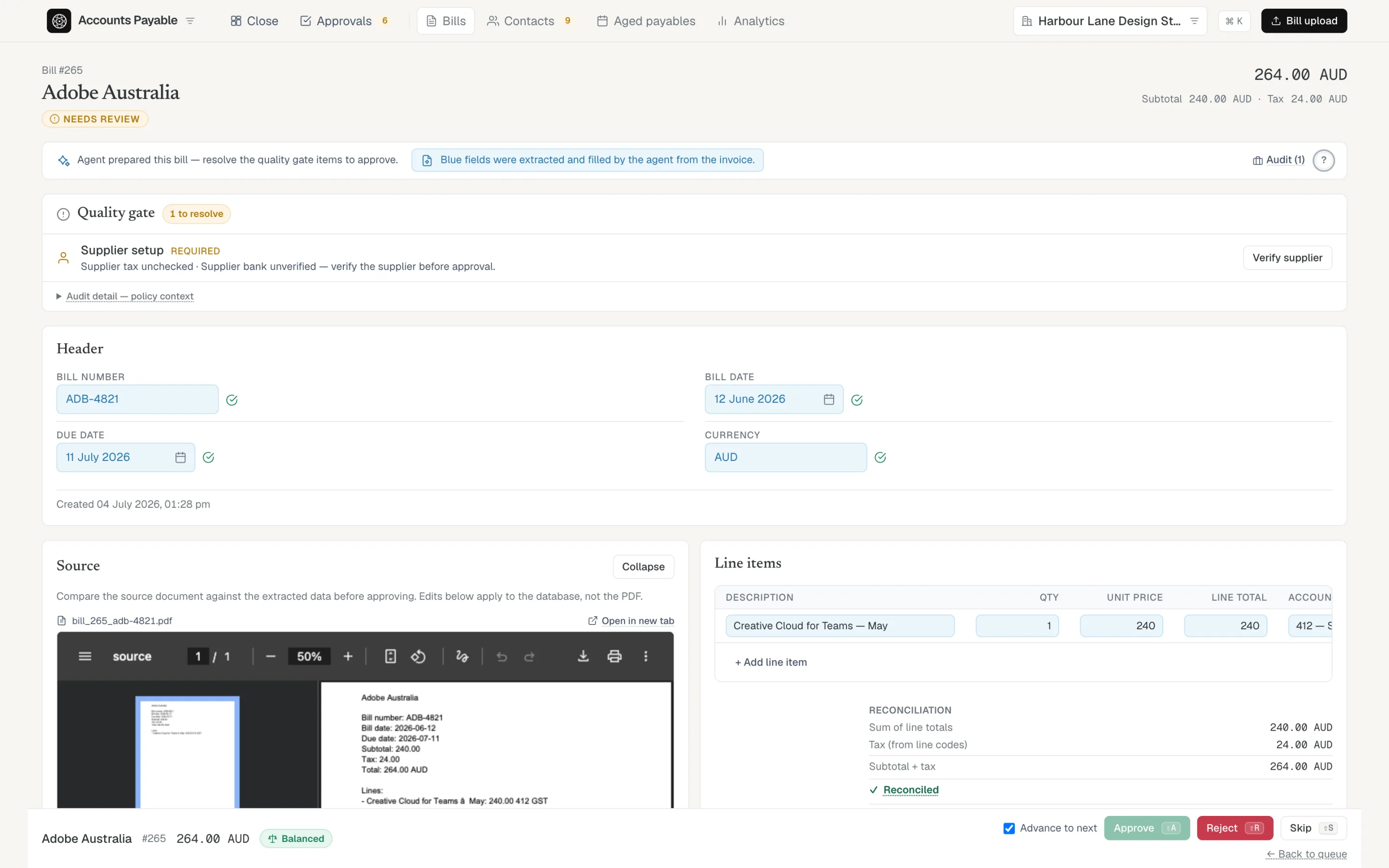
A supplier bill in review: the source PDF beside AI-filled fields shown in blue, a quality gate to clear, and an explicit Approve / Reject decision.
Up close: the source document sits beside the entry, and every value in blue was filled in by the AI. It turns solid once you check or approve it. Nothing is final until you do.
The administrative trap

The bookkeeping bottleneck costs you time and money.

Business owners and accountants are drowning in the same mechanical grind: typing data, categorising expenses, and chasing the documents that back them up.

The growth ceiling

Businesses and firms hit the same capacity limit: manual bookkeeping and a slow month-end close.

The document chase

Finance teams lose hours every week to missing receipts, bank statements, and context scattered across email and chat.

The cost of errors

Work done under time pressure is where mistakes creep in. They surface later as rework, late reports, and questions at audit time.

The AI trust gap

The AI ledger both owners and accountants trust.

Plenty of tools now let AI write straight to your books. Business owners and accountants know better. Give an AI that kind of free rein and its mistakes slip through as quiet, silent errors. We built an open book instead: every figure is visible and checkable before it counts, because no one should have to trust a number the software can’t explain.

The black box

Writes straight to your books, hiding mistakes inside the numbers.
Leaves no trace of how it decided, so you can’t see the working.
Asks you to trust a figure you can’t check.

AccLines — Our transparent workflow

The AI never records anything on its own. It drafts, you approve.
Keeps a permanent log of every edit, approval, and rejection.
Shows its working, in blue, until a human confirms it.
How it works

Three pairs of hands touch every entry. Only you decide.

1
The AI

Reads & drafts

The model turns messy supplier PDFs and bank lines into structured draft entries. Every value it fills is highlighted in blue, so you instantly know what needs checking.

2
The system

Checks the math

Fixed accounting rules, not AI, match suppliers, validate account codes, and balance each document against strict variance policies. Debits equal credits, or it doesn’t pass.

3
The system

Keeps the evidence

Every source document you process is kept and linked to the entry it supports, so your audit folder builds itself as you work instead of becoming a year-end scramble.

4
You

Hold the keys

You review the blue fields, fix the exceptions, and approve. Nothing reaches your financial statements without an explicit human action and a permanent audit trail.

● Bills & invoices

Every exception, surfaced. Nothing buried.

Supplier bills and customer invoices flow through the same review queue. Duplicates, unbalanced totals, missing codes, a changed supplier identity — each collapses into one quiet line of what needs your attention. Clear them from the keyboard, then approve a clean batch in one action.

Amber means it needs you before it can be approved. There’s no “approve anyway.”

Explore bills & invoices →
The approvals queue showing bills with the specific action each one needs before it can be approved.
● Bank reconciliation

The same gate, on every bank line.

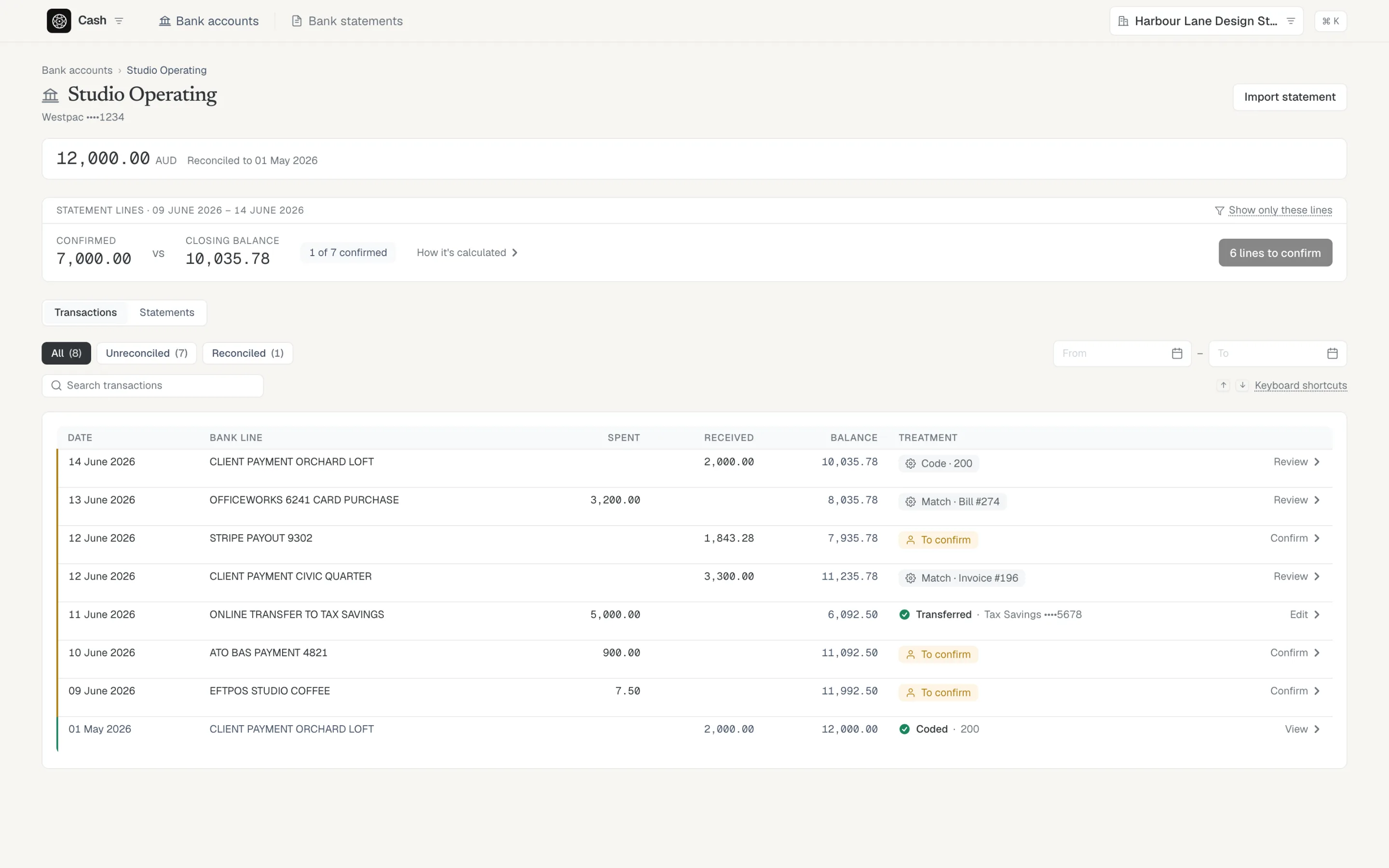
Import a statement and the AI proposes one treatment per line, in blue: match it to a bill or invoice, code it to an account, or mark a transfer between your own accounts. A tie-out band proves your confirmed balance equals the bank’s closing balance, so the reconciliation can’t quietly drift.

Every line you confirm posts to the same ledger as your bills — cash is already in your trial balance. No export, no re-keying.

Explore bank reconciliation →
A bank account mid-reconciliation: each line carries a proposed treatment — match, code, or transfer — and a tie-out band compares the confirmed balance to the bank's closing balance.
✓ Ties to the ledger

Statements that prove themselves.

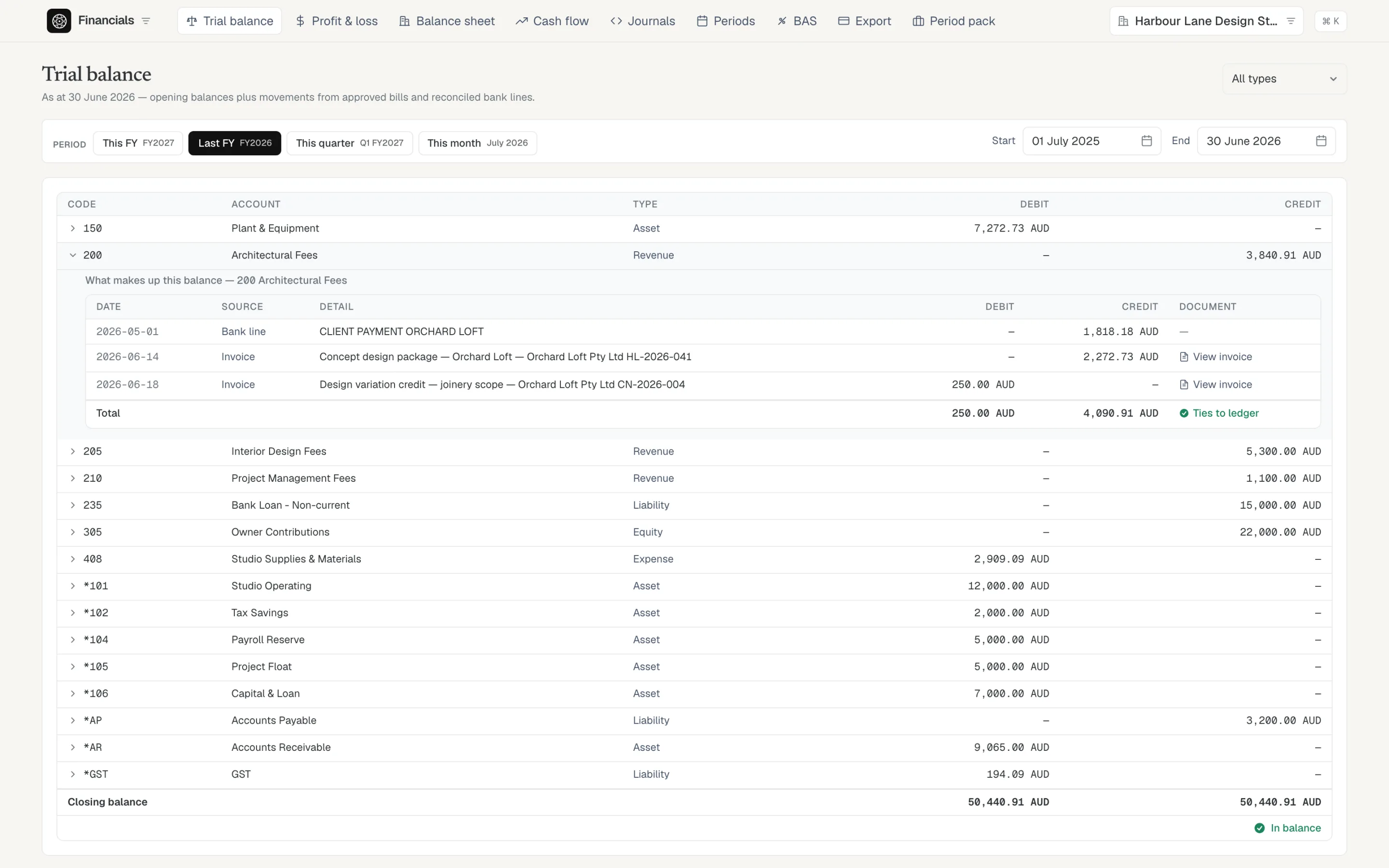
Trial balance, P&L, balance sheet, and cash flow come straight from the entries you approved. Expand any balance to see the postings behind it, then open the source document the AI read. Debits equal credits, and the page tells you so.

Your audit folder is the by-product, not a separate chore.

Explore financials →
Drillable trial balance with one account expanded to the postings behind its balance, each linking to its source document, with a 'ties to ledger' check.
The monthly close

Close the month. Lock the books.

Closing a month freezes its journals and locks every document dated inside it — nothing moves underneath a number you’ve already reported. Reopening is explicit, back-to-front, and lands on the audit trail. BAS comes from the same closed, evidence-backed data.

The Periods screen: May closed and frozen with its entries, June open as the next month to close.

May is closed and frozen; June is next. A closed month can’t drift.

Deployment options

Choose how you host your financial data.

Cloud hosted

Reach it from anywhere.

Hosted access in the browser, with nothing to install, so you and your accountant can work from the same place wherever you are.

Local-first · on-premise

For data that never leaves.

Keep your ledger and audit logs on machines you control. The AI reads your documents securely, and your financial records are never stored on our servers.

The ledger stays yours.

We are opening AccLines to a small group of teams who want AI speed without giving up control of the ledger.

Request early access